How to Delete Telegram Account Permanently in 2022 | Delete Telegram account Permanently on PC | Satya Ki Pathshala
Today in this article I am going to tell you that How to Delete Telegram Account Permanently in 2022. Many of you
Hello Everyone and welcome to my Blog
Satya Ki Pathshala
. Today in this article I am going to tell you that
How to Delete Telegram Account Permanently in 2022. Many of you might
access your Telegram Account from Mobile and PC and didn't find any
option to delete the Telegram Account Permanently. So, don't worry,
today in this article I'll show you that
How to Delete Telegram Account Permanently on PC.
How to Delete Telegram Account Permanently in 2022
If you want to delete your Telegram account from mobile then, you have to follow the process which I am going to tell you now.
1. First "Login" to your Telegram Account.
2. Then Click on "Settings".
3. Then go to "Privacy and Security".
4. Then scroll down and you will find "Delete my Account".
5. There you will find the "schedule" to delete your Telegram Account.
6. After Selecting the schedule the Telegram Account will be Automatically Deleted.
The Step-by-step Images are below:


Delete Telegram Account Permanently on PC
Now, this is the general process to delete your telegram account. You have to follow the above-mentioned process from your mobile and PC to delete the telegram account permanently. Now, if you want to delete your telegram account instantly from PC and mobile, then you have to go to the link which is
Telegram Deactivation Page.
After getting to this page, the page will look like this. There you have to type your mobile number with your County Code. If you are from India then, you have to enter your mobile number like +91XXXXXXXXXX. Here +91 is the Country Code of India.
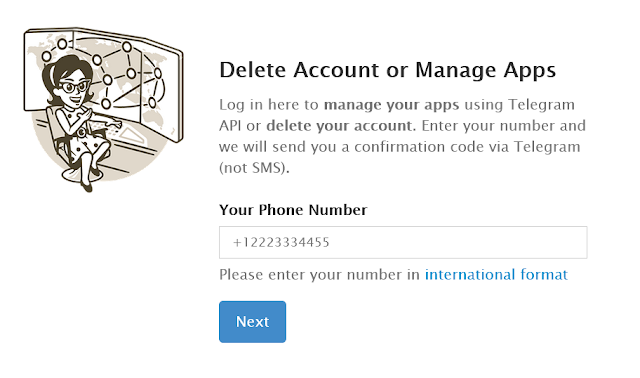
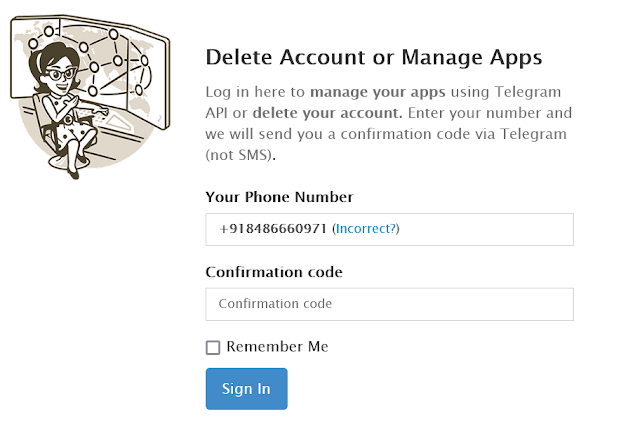
Now after putting your mobile number there, click on next. Now, a confirmation code will be sent to your Telegram Account. You have to copy the Confirmation Code and paste it there in the box. After that, you have to click on Sign In.
Now, you have to mention the reason why are you deleting your Telegram Account. Or, if you want you can leave the box blank. After that click on Delete My Account. You will see a popup window. There you have to click on Yes Delete My Account.
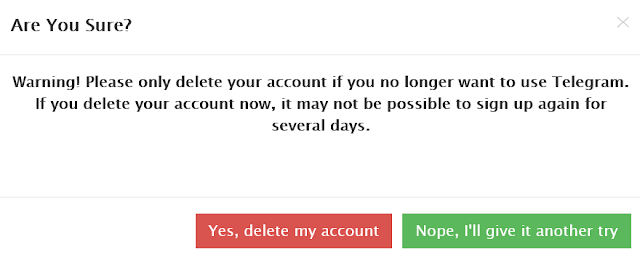
That's it, you have successfully deleted your Telegram Account Permanently.
I hope you liked the post. If you liked the post then say it in the comment section. I'll be happy to know that. So, keep visiting this site to get interesting stuff. I'll see you with another interesting article. Till then, take care and support me.
Join the conversation